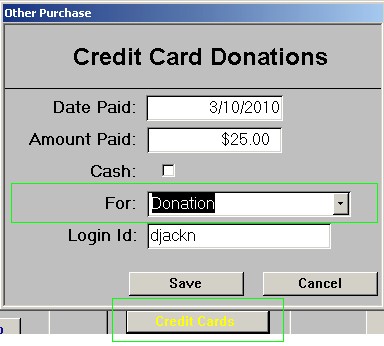

1. Open the “money2db” database program on the donations computer.
2. Click “Payments”
3. Click “Individuals”
4. Enter the last name of the person. Press Enter (The receipt must be made out to the person who wrote the cheque regardless of the Login ID.)
5. If the person doesn’t exist in the donations database, click “Add New Person. Otherwise, highlight the person, then click “Choose Highlighted Person” and skip to STEP 7.
6. Enter the person’s contact information, then click “Save”.
7. Always click on Donations and always select For “Donation”. If it is a cash donation, do not forget to click on Cash checkbox.
8. Enter the cash or cheque amount. If it is a cash donation, check off “Cash” box. Enter the user’s login id. Do a User Search in Putty to find the users’s correct login id.
NOTE: Some people just donate money to VCN, enter in “anonymous” for last name.
9. If the user is in the office, print a receipt for them. Click on “View or Print Receipts”. VCN will send official tax receipts to users who donate $25 or more each year.

10. Click on the arrow buttons at the bottom to move to the last donation record, ie Record 9 of 9 (Filtered).

11. Check the “Date Paid” field is today, then click Print Receipt and hand the user the receipt. Before you close the screen: If the donation is a check, stamp it on the back where it is labelled “Endorsement – Signature or Stamp” with the “FOR DEPOSIT ONLY…” stamp. Now write down the “Receipt #” on the back of the cheque too.
12. Before officially printing the receipt, you must save the document by clicking on Print Receipt and saving that as a .pdf file using the CutePDF program. Upon saving, you must save the file inside the folder named Receipt. Save it according to date. For example, if today’s date was January 10 2013, then create a new folder named January 10 2013. Save the file according to the person’s username separated by an underscore and then type the word “Receipt“. An example would be vorvis_Receipt.
13. Once you have created the .pdf file, then you must proceed into printing it. Under the 2nd line, write with a pen “Signed and Recorded by your name“.
14. Don’t forget to fold the paper into a three-fold.
15. Then, when you are ready, paper-clip the cash or cheque to the paper.
16. Slide the money or cheque into the top drawer.